Import published files
Geometry and scene files that have been published as versions in ftrack can be imported into Cinema 4D. When selecting import on a version you are presented with a list of available files that can be imported.
When a file is imported into Cinema 4D, an XRef object will be created and inserted into the active project, pointing to the version. The XRef object will have a ftrack tag with an f icon, so you can easily tell if it was imported from ftrack.
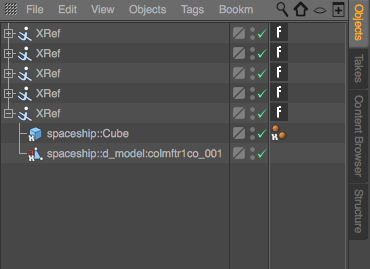
The Object Manager in Cinema 4D showing imported ftrack assets.
More information about importing published material can be found here.
Note
If a file is unavailable for import it means that it is not available in a storage that you are able to read from.